Click Edit > Stitch Edit to place stitch cursor at a selected insertion point.
|
|
Click Edit > Stitch Edit to place stitch cursor at a selected insertion point. |
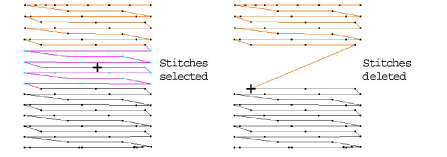
You can delete individual or groups of selected stitches.
Caution: If an object’s stitches are regenerated for any reason, all stitch editing functions are lost. Where possible, edit the object properties rather than individual stitches.
1Select Edit > Stitch Edit. Alternatively press E.
2Select a stitch or stitches.
3Press Delete.
Zoom in and display the needle points for easier selection.